Features
Everything under
the hood.
A detailed look at what IkaSolver does, how it works, and what makes it different.
Getting Started
Building is as easy as
1, 2, 3.
Configure your game, set up your bounties, define your bet sizes — then hit solve.
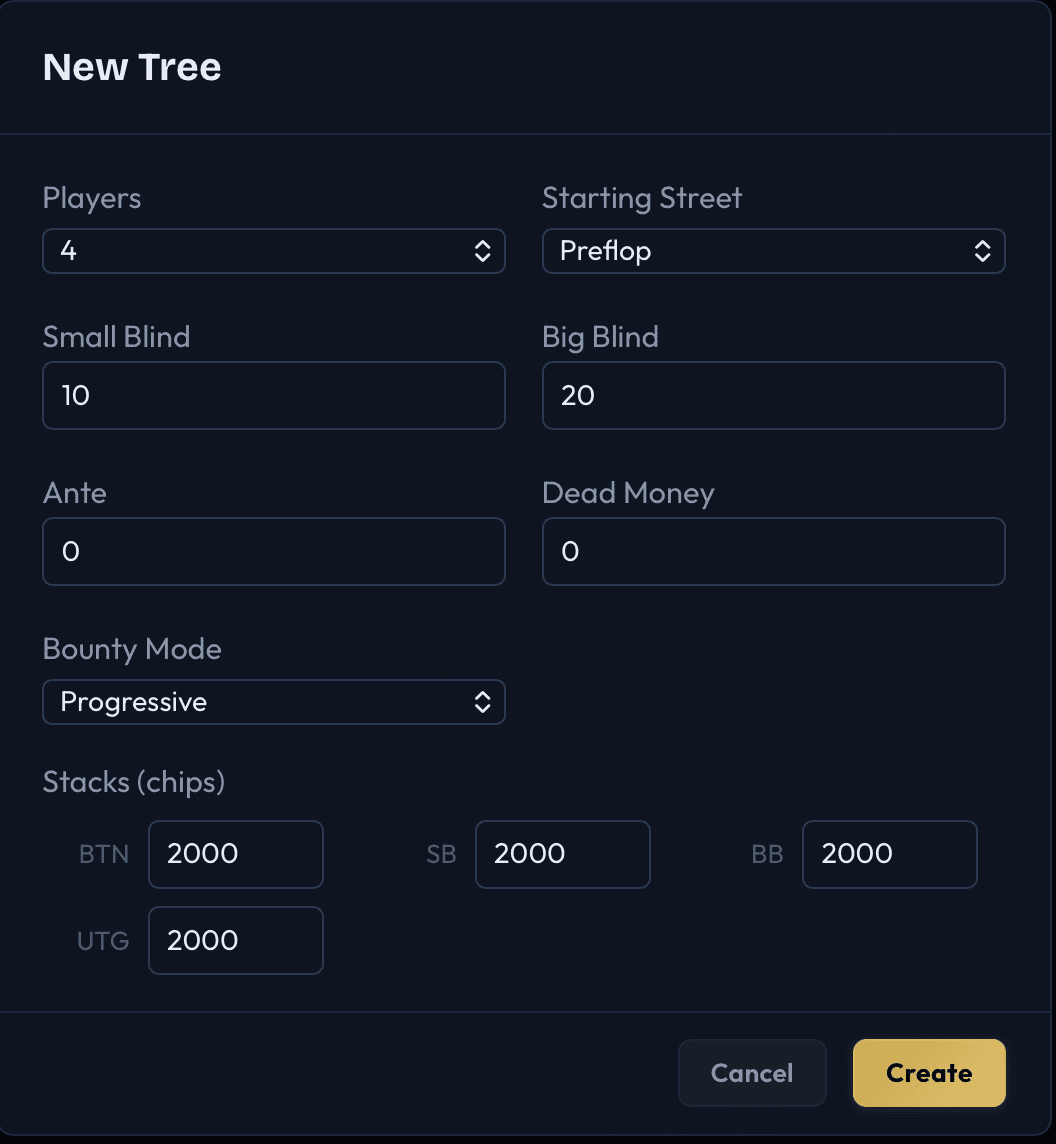
Configure your game
Set the number of players, stack sizes, blinds, antes, and bounty mode.
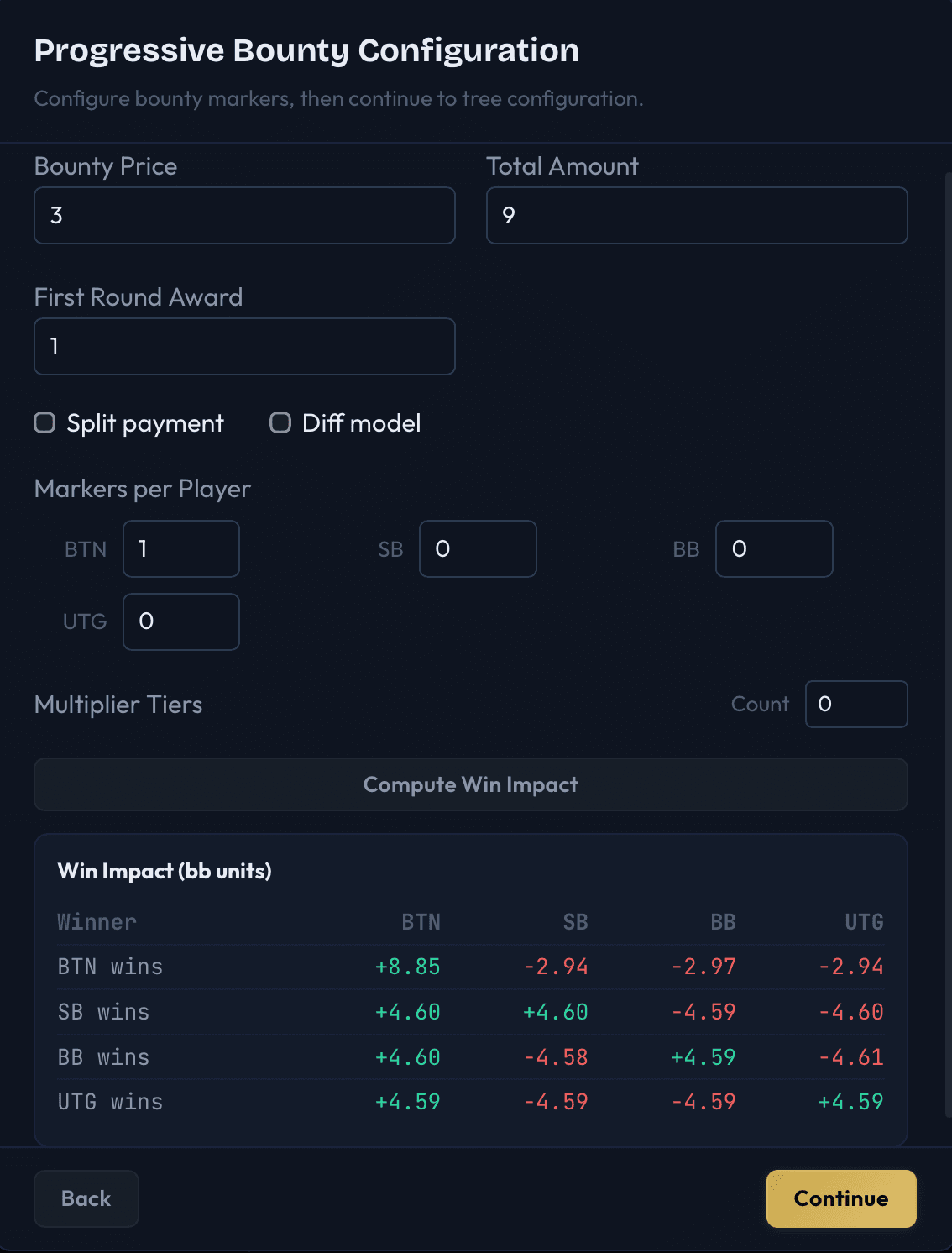
Set up bounties
Configure bounty price, markers per player, multiplier tiers, and win impact.
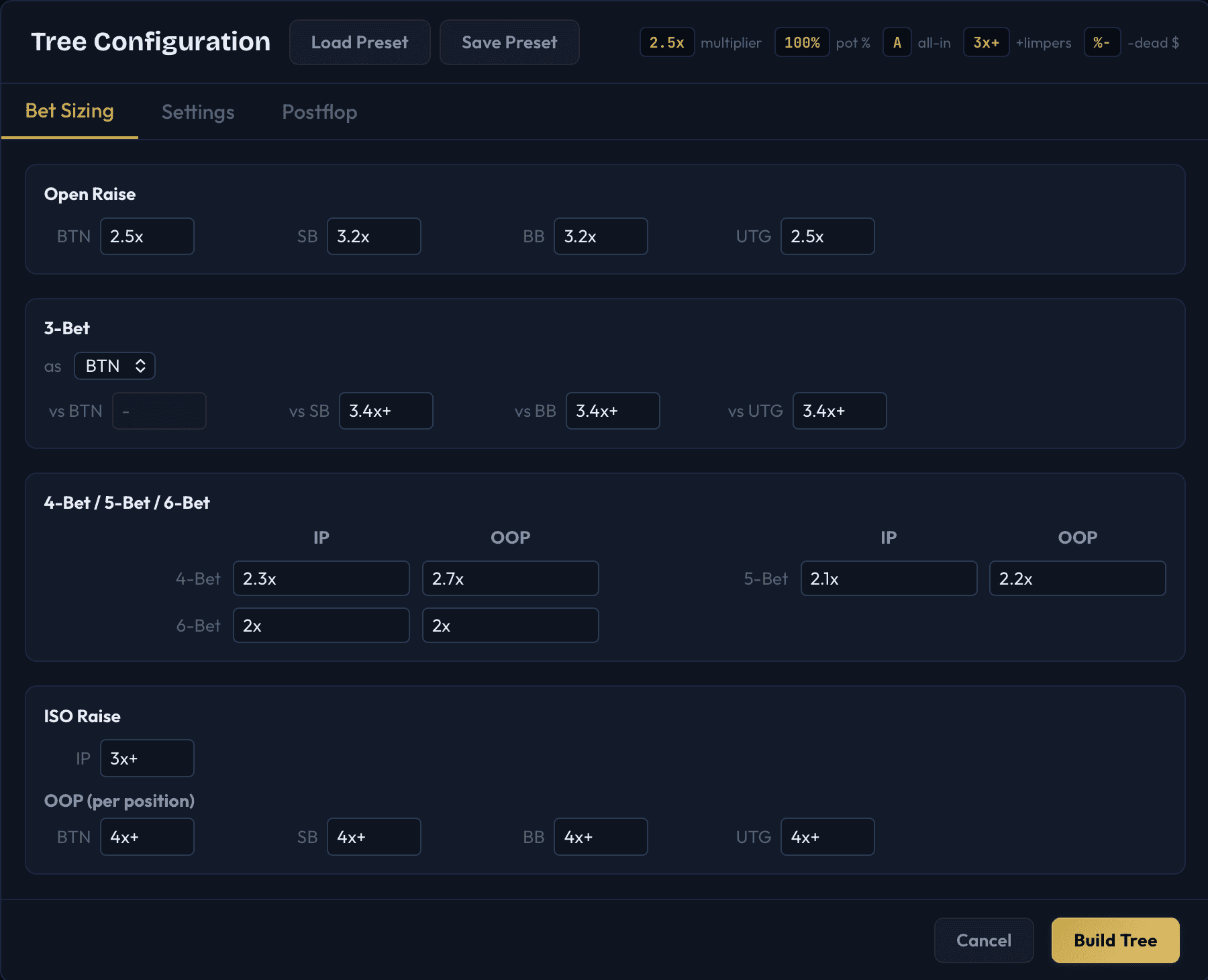
Define your bet sizes
Set position-specific open raises, 3-bet sizes, postflop sizing, and presets.
Study
Live results
as the solve runs.
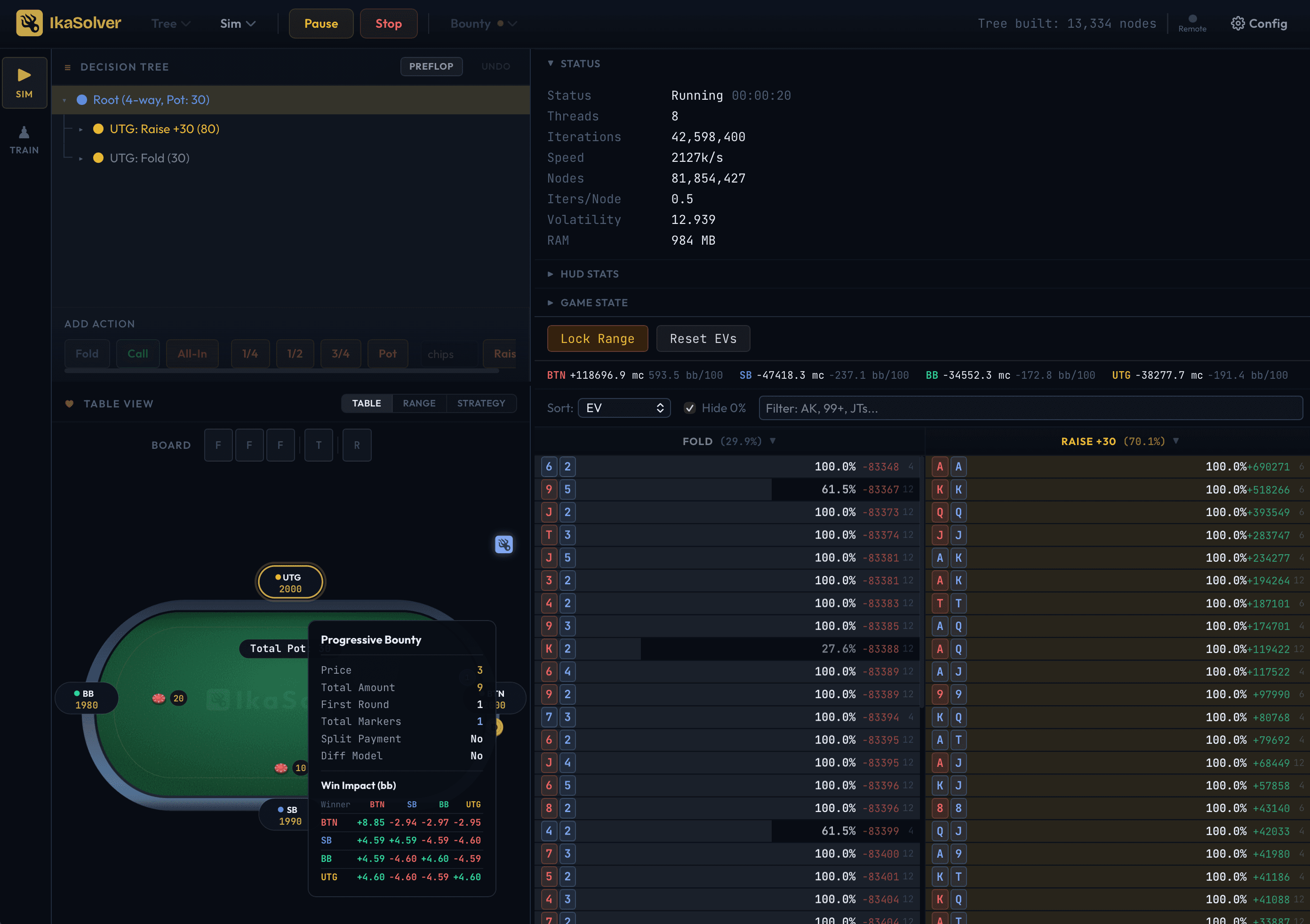
Watch your simulation converge in real time with live-updating strategies, hand frequencies, and EV breakdowns across every position.
Train
Train vs
your simulations.
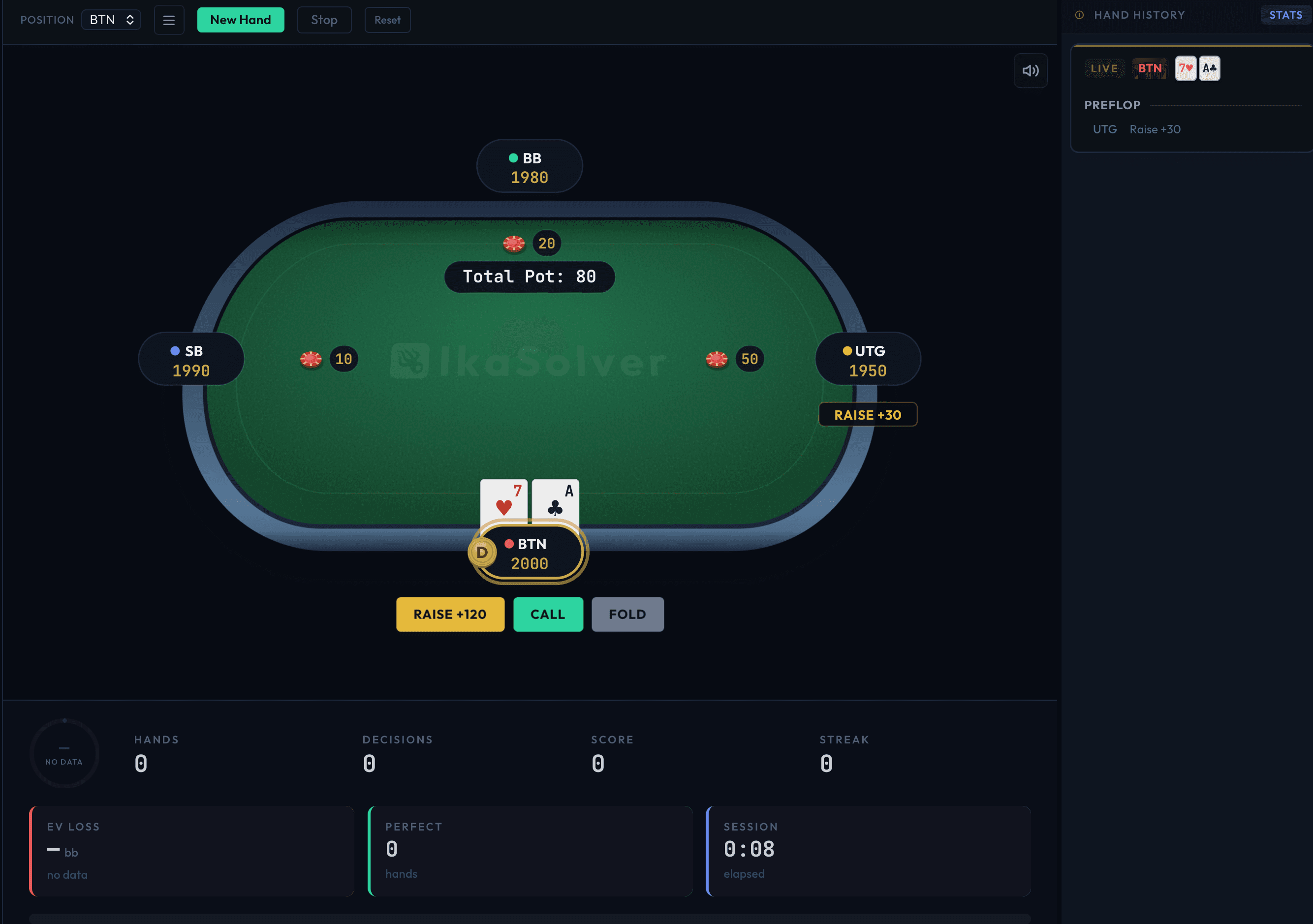
The built-in trainer deals you hands from any solved tree and grades every decision against the optimal strategy.
Built for speed.
10M+ combo-hand iterations a second.
IkaSolver processes over 10 million hand combinations per second, using every CPU core on your machine. It's built from the ground up for speed - so you spend less time waiting and more time studying.
How fast is it compared to other solvers?
IkaSolver delivers over 10 million combo-hand iterations per second. A complex 6-player preflop tree converges fast enough to solve several variations of a spot in one sitting.
Does it use all my CPU cores?
Yes. The solver automatically detects and uses every available core on your machine. More cores means faster solving - performance scales proportionally.
How much memory does it need?
Significantly less than competing solvers. IkaSolver shows you exactly how much memory a solve will need before you start, so you'll never run out mid-solve.
Does accuracy improve over time?
Yes. The longer you let the solver run, the more precise the strategy becomes. A built-in accuracy indicator tells you when the solution has converged enough to be reliable. You can also set a target accuracy level and the solver will stop automatically when it's reached.
Can I solve multiple boards at once?
Yes. The batch solve feature lets you queue up multiple flop boards and solve them all in sequence. You can choose from all 1,755 strategically unique flops, or pick a custom subset. The solver shows live progress as it works through the queue.
Design your scenarios.
Any table size, any bet structure.
Set up the exact poker situation you want to study. Choose between 2 and 9 players, set stack sizes, blinds, antes, and rake - then define exactly which bet sizes and actions are available at every decision point. IkaSolver builds the full decision tree for you.
What can I configure for the game setup?
Everything you'd find at a real table: number of players (2 to 9), stack sizes per position, small blind, big blind, ante, dead money, and rake (with optional cap). You can also start from any street - preflop, flop, turn, or river - with a custom starting pot and board cards.
How does preflop bet sizing work?
You have full control over every raise size. Set position-specific open raises (e.g. BTN opens 2.5x, SB opens 3.2x), custom 3-bet sizes for each position matchup, and separate in-position / out-of-position sizes for 4-bets, 5-bets, and 6-bets. You can also configure iso-raise sizes against limpers.
What about postflop bet sizing?
Postflop bets are configured using stack-to-pot ratio (SPR) tiers. For example, when the SPR is below 3, you might want a small 33% pot bet. When the SPR is higher, you might prefer a full pot-sized bet. You can set separate sizing rules for the flop, turn, and river, and control when all-in is offered as an option.
What sizing formats can I use?
Three formats: multiplier (e.g. '2.5x' the previous bet), percentage of pot (e.g. '75%'), or all-in ('A'). You can combine multiple sizes at the same decision point, like '50%, 75%, A' to give the solver three choices. There's also a '+' modifier for adjusting sizes based on the number of callers.
Can I control limping and cold-calling rules?
Yes. You can set the maximum number of limpers allowed, control whether players can cold-call into a 3-bet, enable or disable back-raises, and toggle donk bets (betting into the previous street's aggressor). You can also set pot-limit mode to cap all raises at the pot size.
What is size optimisation?
An optional feature that automatically finds the single best raise size at each decision point. Instead of solving with multiple sizes and picking the best one manually, the optimiser tests each option and keeps only the one that matters most. This gives you a cleaner, simpler strategy.
Can I save and reuse my configurations?
Yes. Save your tree configurations as presets and load them later. You can also export trees to share with others or import trees from external sources.
What export formats are supported?
Solved strategies can be exported in IKS format (IkaSolver's native format that preserves the full solution) or PIO-compatible format for use with PioSolver-based workflows.
See how every hand should play.
Frequency, action, and expected value.
At any point in the game tree, see exactly what the optimal strategy is for every possible starting hand. The solver shows you how often each hand should fold, call, raise, or go all-in - and how much each hand is worth.
What information do I see for each hand?
For every starting hand (like AK, pocket queens, or 7-2 offsuit), you see: how often it should take each action, and the expected profit or loss from playing it. This helps you understand which hands are strong in each spot.
Can I see what my opponents should be doing?
Yes. Click on any player at the table to see their range - which hands they should have in this spot and how those hands are distributed across actions.
Can I watch the solution develop in real time?
Yes. While the solver is running, the hand frequencies update live every couple of seconds. You can watch the strategy take shape as it becomes more accurate.
Can I search for specific hands?
Yes. Use the filter to search for hands like 'AK', 'pocket pairs', or 'suited connectors'. You can also sort by how often a hand takes a certain action, or by its expected value.
Can I group hands by strength?
Yes. On postflop boards, you can filter hands by made-hand strength (top pair, overpair, two pair, sets, flushes, etc.) and by draw type (flush draw, open-ended straight draw, gutshot). This makes it easy to see how the solver plays different categories of hands.
Are there HUD-style statistics?
Yes. IkaSolver computes common poker HUD stats for each position - including VPIP (how often a player enters the pot), PFR (pre-flop raise rate), 3-bet frequency, c-bet rate, and more. These are colour-coded to highlight how each position differs from average.
The full picture at a glance.
All hands in one view.
The strategy grid shows the optimal play for every starting hand in a single, colour-coded view. Each hand is shown as a cell with coloured bars representing how often you should fold, call, raise, or go all-in. Spot patterns instantly - no scrolling required.
What do the colours mean?
Grey means fold, green means call, gold/yellow means raise, and red means all-in. The width of each colour shows how often that action should be taken. A fully green cell means you should always call; a mix of colours means you should sometimes take different actions.
Can I click on a hand to see more detail?
Yes. Click any cell to see the full breakdown - the exact frequencies for each action, the expected value, and (for postflop) the breakdown by specific card combinations.
Is there a table view too?
Yes. The interactive poker table shows player positions, chip stacks, bets, and the pot. Click any player to see their range. It's a visual way to understand what's happening at each point in the game.
Make strategies playable.
Simplify without losing edge.
GTO strategies can be complex - mixing between three or four actions with precise frequencies. IkaSolver's simplification tools let you lock specific hands to specific actions and see exactly how much it costs you. Build simplified strategies that are practical to execute at the table, with a clear understanding of the trade-off.
How does simplification work?
You choose which hands to lock to specific actions (e.g. always fold 7-2 offsuit, always raise pocket aces). The solver shows you the expected value before and after the change, so you can see exactly how much the simplification costs.
Can I lock specific hand combos?
Yes. The range lock editor lets you lock entire hand classes (like all pocket pairs), specific hands, or even individual suit combos. You can use standard range notation or click hands on a visual grid.
Does it show the cost of simplifying?
Yes. For every change, IkaSolver shows the before and after expected value for each player and the total pot EV loss as a percentage. This makes it easy to see whether a simplification is worth the trade-off.
Practice makes perfect.
Get graded on every decision.
The built-in trainer deals you hands and asks you to make decisions. After each choice, it tells you whether you played correctly, made a small mistake, or made a big error. Over time, you'll build muscle memory for optimal play.
How does the scoring work?
Every decision you make is compared against the solver's optimal strategy and rated: Best (perfect play), Correct (good alternative), Inaccuracy (slightly off), Mistake (noticeable error), or Blunder (big mistake). You'll get a colour-coded result after each action.
Can I pick which seat to practice from?
Yes. Choose any position - Button, Small Blind, Big Blind, or any other seat. The trainer deals you realistic hands for that position and sets up opponents accordingly.
Can I review hands I've played?
Yes. Every hand is saved in a sidebar history. Click any past hand to replay it and see what the solver recommended at each decision point compared to what you chose.
Is there sound feedback?
Yes. Each result plays a different sound - a pleasant tone for correct plays, a warning sound for mistakes. You can mute this if you prefer visual-only feedback.
Can I speed up practice?
Yes. Instant mode skips the delay between hands so you can rapid-fire through decisions. There's also a timed mode that adds a countdown clock for each decision, simulating real-time pressure.
Can I practice specific hands?
Yes. Use the hand filter to focus on specific ranges - like 'AK+', 'pocket pairs 77-99', or 'suited connectors'. This lets you drill the spots you find most difficult.
Know exactly where to improve.
Your strengths and weaknesses, laid bare.
The trainer tracks your results over time and shows you where you're strong and where you're leaking money. See your accuracy broken down by street (preflop, flop, turn, river) and by position - so you can focus your practice where it matters most.
What gets tracked?
Everything: how many sessions you've played, total hands, total decisions, your best streak, how much expected value you've lost, and accuracy percentages broken down by street and position.
How does it find my weaknesses?
The trainer looks at your accuracy across different streets and positions, and highlights the areas where you're making the most mistakes. For example, it might tell you 'Weakest on preflop: 41% accuracy' or 'Weakest as BTN: 64% accuracy'.
Is my progress saved between sessions?
Yes. All your training history is saved automatically. When you come back, your complete stats and hand history are still there.
Customisable games, built in.
Solve Progressive and regular Stand-up formats, with complete flexibility over marker count, multipliers and payout format.
IkaSolver solves progressive bounties and stand-up bounty games out of the box. Set the bounty price, number of markers, multiplier tiers, and payout structure - then see exactly how the bounty system changes the optimal strategy for every position.
What are Squid and Stand-Up modes?
Squid mode is IkaSolver's name for progressive-bounty tournaments — the format known industry-wide as PKO or Progressive Knockout. Players can win multiple markers, and even get rewarded for hitting different multiplier levels. In Stand-Up mode, markers can only be won once per player. In Squid the game can end when all markers are won, or when one player remains without a marker. In Stand-Up the game ends when one player remains without a marker.
How do bounties change the strategy?
The solver calculates a 'Win Impact' table that shows how many big blinds each player gains or loses from the bounty system when any given player wins the pot. This is on top of the normal pot equity - it's the extra value from knocking someone out.
Can I set up multiplier tiers?
Yes. Configure how many markers a player needs to reach each multiplier level. For example: 3 markers = 2x bounty, 5 markers = 3x, 7 markers = 4x. The solver accounts for all of this when computing optimal strategies.
Do you support regular holdem?
Yes, we also offer a standard holdem solver that contains all the same optimisations as our Squid and Stand-Up solver.
Use a powerful server.
Keep your laptop free.
Run the solver on a powerful cloud server or dedicated machine, then connect to it from your regular computer. You get the full interface with live-updating results, while all the heavy computation happens elsewhere. If you disconnect, the server keeps solving - just reconnect later and pick up where you left off.
How does remote solving work?
You start the solver on a remote server (any Linux machine), then connect to it from the desktop app on your computer. The connection is live - you see results updating in real-time, just as if the solver was running locally.
What happens if my internet drops?
The server keeps solving. When you reconnect, everything syncs up automatically - no progress is lost. You can even close your laptop, open it later, and continue right where you left off.
Can I solve locally too?
Yes. You can solve on your own machine for quick experiments, and switch to a remote server when you need more power. The experience is identical either way.
What kind of server do I need?
Any Linux server works. The more CPU cores and RAM it has, the faster it solves and the larger the trees it can handle. The app tells you exactly how much memory you'll need before you start.
Ready to see it in action?
Want the theory first? Read our guide to progressive bounty (PKO) and Squid strategy.