Bounty Mode
Bounty mode adjusts solver calculations to account for customisable payoff structures — the additional prize you earn for eliminating another player. In standard cash game or chip-EV solves, winning a pot is worth exactly the chips in it. In Squid and Stand-Up games, knocking out a player awards extra value beyond the pot, which changes optimal strategy significantly.
New to bounty formats? Start with our Squid poker strategy guide for how progressive bounties change correct play, then come back here for the configuration reference.
IkaSolver supports two bounty formats: Progressive Bounty and Standup Bounty. Bounty solving is included in the Squid & Stand-Up + Trainer licence.
Progressive Bounty
In Progressive Bounty tournaments (also known as Progressive Knockout or PKO), each player carries a bounty that grows as they eliminate other players. When you knock someone out, you receive a portion of their bounty and your own bounty increases. This creates escalating incentive to play aggressively against short stacks and players with large bounties.
Key characteristics:
- Bounty markers accumulate through play
- Eliminating a player awards a share of their accumulated bounty
- Your own bounty grows as you collect markers
- Multiplier tiers can increase the bounty payout at certain thresholds
Standup Bounty
In Standup Bounty format, each player has a fixed bounty status - either they have a bounty or they don't. There's no accumulation. The solver accounts for the flat bounty value when calculating EV.
Key characteristics:
- Fixed markers per player (either has bounty or doesn't)
- No accumulation or multiplier tiers
- Simpler model, suitable for standard knockout games
Configuration
Bounty can be configured in two places:
- New Tree dialog - When creating a new tree, you can choose Progressive Bounty or Standup Bounty as the game mode. A dedicated configuration dialog appears before tree building.
- Settings drawer - The Bounty section (collapsed by default) in the Settings panel lets you view and edit the bounty configuration for the current tree.
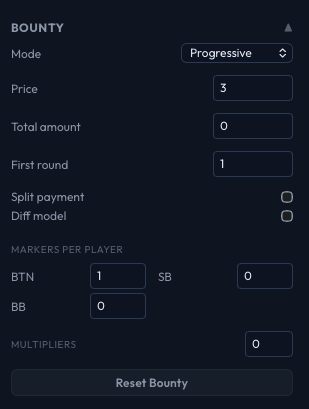
Configuration Fields
Mode
Choose between Progressive and Standup. This determines which fields are available and how the solver handles bounty calculations.
Price
The base bounty price - the entry fee contribution that goes toward bounties. This is a fundamental parameter that affects how much extra EV is at stake in each hand.
Total Amount
(Progressive mode only) The total bounty pool amount. Combined with the price, this determines the bounty economics of the game.
First Round Award
The bounty amount awarded in the first round. Minimum value is 1. This sets the baseline for how much a knockout is worth before any multipliers apply.
Split Payment
When enabled, the bounty payment is split between the winner and the remaining pool. This models games where you receive a percentage of the bounty immediately and the rest adds to your own bounty.
Diff Model
Enables the differential model for bounty calculations. This affects how the solver computes the EV difference between winning and losing in bounty-relevant spots.
Per-Position Markers
For each player position in the tree, you set their bounty marker count:
- Progressive mode: Enter the number of markers each position currently holds. Different marker counts at different positions create asymmetric bounty incentives - a player with many markers is a more valuable target.
- Standup mode: Check or uncheck the "Sat?" checkbox for each position to indicate whether that player has already secured their bounty ("sat" = satisfied). Players who have satisfied their bounty status play differently because the bounty incentive no longer applies to them.

Multiplier Tiers
(Progressive mode only) You can define up to 10 multiplier tiers that increase the bounty payout at certain marker thresholds. Set the tier count, then configure each tier:
- At markers - The marker threshold that triggers this multiplier
- Multiplier - The multiplier applied to bounty payouts when a player's markers reach this threshold
For example, setting a tier at 5 markers with a 2x multiplier means that when a player accumulates 5 or more markers, their bounty payout doubles.

Compute Win Impact
After configuring bounty settings, click Compute Win Impact to see a matrix showing how bounties affect EV. The matrix displays, in big blind units, the EV impact for each player when each other player is eliminated. This helps verify your configuration is correct before running the solver.
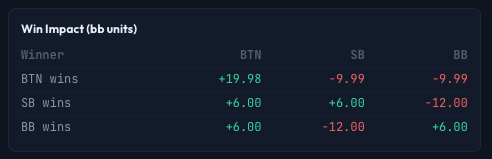
Viewing Win Impact In-Game
During a solve or when browsing results, you can view the bounty configuration and win impact matrix directly on the poker table. Hover over the squid icon in the top-right corner of the table to see a tooltip showing the current progressive bounty settings (price, total amount, markers, etc.) and the win impact matrix in big blinds.
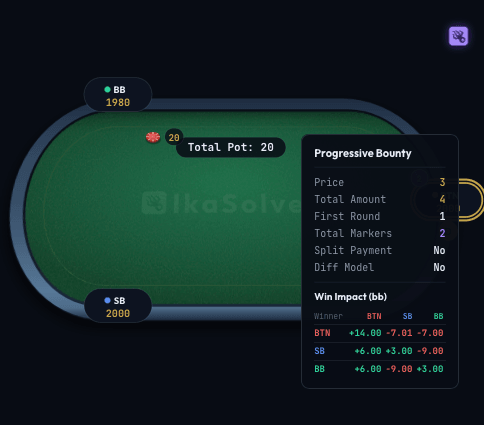
The matrix shows each player as both a "Winner" (rows) and a target (columns). Positive values (green) indicate EV gained; negative values (red) indicate EV lost. This is the same data as the Compute Win Impact button in the settings drawer, but accessible at a glance while analyzing the game.
Reset Bounty
Click Reset Bounty to clear all bounty configuration and return to a standard (non-bounty) solve.
Validation
If the bounty configuration has errors (e.g., incompatible settings for the number of players), a red validation message appears at the bottom of the panel describing the issue.
CLI Usage
When running the solver from the command line, pass a bounty configuration JSON file using the --squid-config flag:
ikasolver --tree game.tree --squid-config bounty.jsonThe JSON file should contain the same fields as the GUI configuration (price, total amount, markers, multipliers, etc.). This is useful for batch solving bounty scenarios or running bounty solves on a remote server.