Creating a Tree
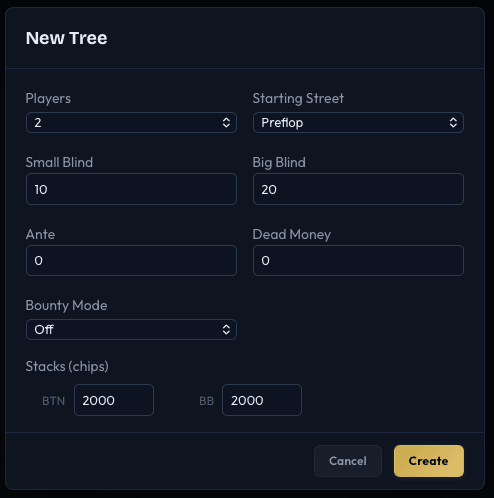
The first step in any solve is creating a game tree. The New Tree dialog (Cmd+N / Ctrl+N) defines the fundamental parameters: how many players, the blind structure, stack depths, and which street to start from.
Players
Choose between 2 and 9 players. The number of players determines the position names and the complexity of the resulting tree.
Position names by player count:
| Players | Positions |
|---|---|
| 2 | BTN, BB |
| 3 | BTN, SB, BB |
| 4 | BTN, SB, BB, UTG |
| 5 | BTN, SB, BB, UTG, CO |
| 6 | BTN, SB, BB, UTG, MP, CO |
| 7 | BTN, SB, BB, UTG, MP, HJ, CO |
| 8 | BTN, SB, BB, UTG, UTG+1, LJ, HJ, CO |
| 9 | BTN, SB, BB, UTG, UTG+1, MP, LJ, HJ, CO |
In IkaSolver, positions are listed in action order starting from the BTN. For a standard preflop tree, the order of action is UTG first through to BB (with the BTN acting last preflop when there are 3+ players, and first when heads-up).
Starting Street
Select which street the tree begins on:
- Preflop - The standard starting point. Players post blinds and act in full preflop order.
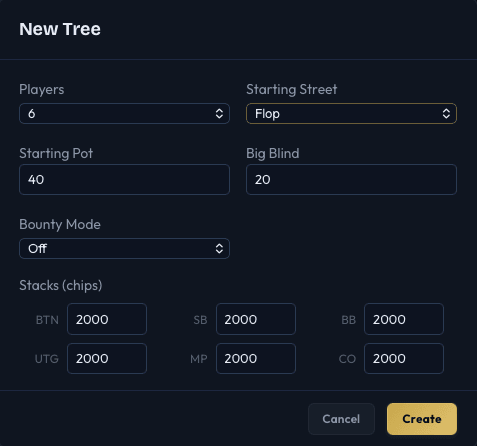
- Flop - The tree starts on the flop. You set a starting pot and choose board cards before solving.
- Turn - Starts on the turn with 4 community cards.
- River - Starts on the river with 5 community cards.
Starting from a later street is useful for studying specific postflop situations. See Postflop Trees for details on how postflop settings differ.
Blinds and Antes (Preflop)
When starting from preflop, you configure:
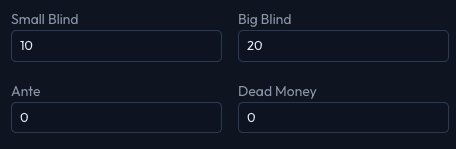
- Small Blind - The forced bet posted by the SB (default: 10 chips)
- Big Blind - The forced bet posted by the BB (default: 20 chips)
- Ante - Per-player ante added to the pot before action begins (default: 0)
- Dead Money - Extra chips in the pot not belonging to any player (default: 0). Useful for modeling antes from players not in the hand.
Starting Pot and Big Blind (Postflop)
When starting from flop, turn, or river, the blind fields are replaced with:
- Starting Pot - The total chips in the pot at the start of the street (default: 40 chips). This represents whatever action occurred before this point.
- Big Blind - Kept for display purposes only (EV is shown in bb/100 format). No blinds are actually posted.
Stack Sizes
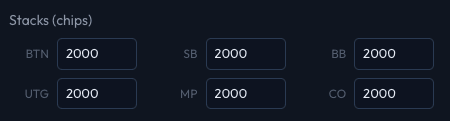
Each position has its own stack size field, defaulting to 2000 chips (100 big blinds with default blinds). You can set different stacks per position to model uneven-stack scenarios.
Stacks are measured in chips, not big blinds. With a BB of 20, a stack of 2000 chips equals 100 big blinds.
Bounty Mode
If your license includes bounty support, you can choose a bounty mode for the tree:
- Off - Standard cash game solving (no bounty adjustments)
- Progressive - Progressive Bounty mode, where bounty markers accumulate as players are eliminated. Markers per player are configured in the next step.
- Standup - Standup Bounty mode, where each player has a fixed bounty (on or off). Players are either "standing" (have a bounty) or not.
Bounty mode is selected here but configured in detail after tree creation.
The Tree Builder Panel
When you click New Tree (Cmd+N / Ctrl+N), the Tree Builder panel opens on the left side of the screen. This panel contains all configuration in collapsible accordion sections:
- Game Setup - Players, blinds, stacks, starting street
- Preflop Sizing - Open raises, 3-bets, 4-6 bets, ISO raises (hidden for postflop-only trees)
- Postflop Sizing - Geometric sizing, SPR-based bet sizes, all-in options
- Settings - Thresholds, toggles (pot limit, donks, etc.)
- Starting Ranges - Hand weights per position (postflop trees only)
- Bounty - Mode selector and bounty configuration (if applicable)
As you adjust settings, the poker table updates in real-time to show the current player positions, stacks, and blind structure.
Preview and Build
The Tree Builder panel has two ways to create the tree:
- Preview Tree - A button that appears overlaid on the tree view whenever you change settings. Click it to build the tree from your current settings while keeping the panel open, so you can inspect the result and make further adjustments.
- Build Tree - The button at the bottom of the panel. Builds the tree and closes the panel, returning you to the normal view for solving.
You can reopen the Tree Builder at any time via Tree > New Tree or Cmd+B / Ctrl+B. When reopening, all settings from the current tree are preserved so you can make incremental changes without re-entering everything.
Tree Node Display
Once built, the decision tree displays each action with its size in big blinds and the resulting pot:
- Preflop raises show the raise-to amount in bb: e.g.,
BTN 2.5bb (70)means BTN raises to 2.5 big blinds, making the pot 70 chips. - Postflop bets show the bet size in bb: e.g.,
BB 3.3bb (120)means BB bets 3.3 big blinds into a pot that becomes 120 chips. - All-in, Call, Check, and Fold are shown by name.