Starting Ranges
Starting ranges define which hands each player holds (and at what frequency) at the beginning of a solve. They are most important for postflop trees, where you want to model realistic preflop ranges that each player would arrive with on a given board.
When to Use Starting Ranges
- Postflop trees: The Starting Ranges dialog appears automatically after creating a postflop tree. You should set ranges that reflect the preflop action leading to this spot (e.g., BTN's opening range vs BB's calling range).
- Preflop trees: Starting ranges are not typically needed since the solver starts with all 1326 combos. However, you can open the Starting Ranges editor from the toolbar Ranges button to restrict starting hands if desired.
The Starting Ranges Dialog
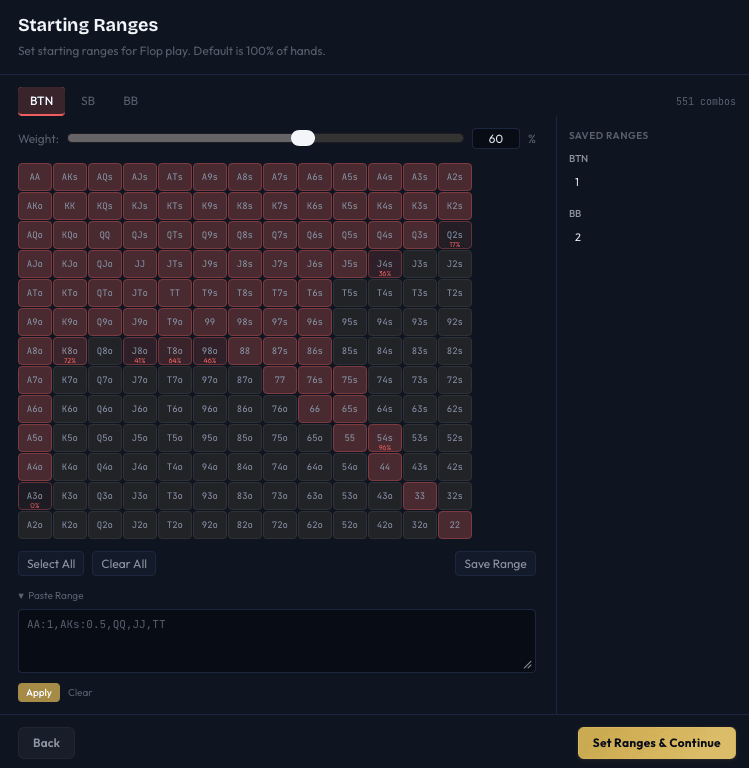
Player Tabs
Tabs along the top let you switch between players. Each player has their own independent 169-cell grid (one cell per hand class: AA, AKs, AKo, etc.). The combo count for the active player is shown on the right.
The 13x13 Grid
The grid maps to all 169 unique starting hands in Hold'em:
- Diagonal cells (AA, KK, QQ, ..., 22) are pocket pairs
- Above the diagonal (AKs, AQs, ...) are suited hands
- Below the diagonal (AKo, AQo, ...) are offsuit hands
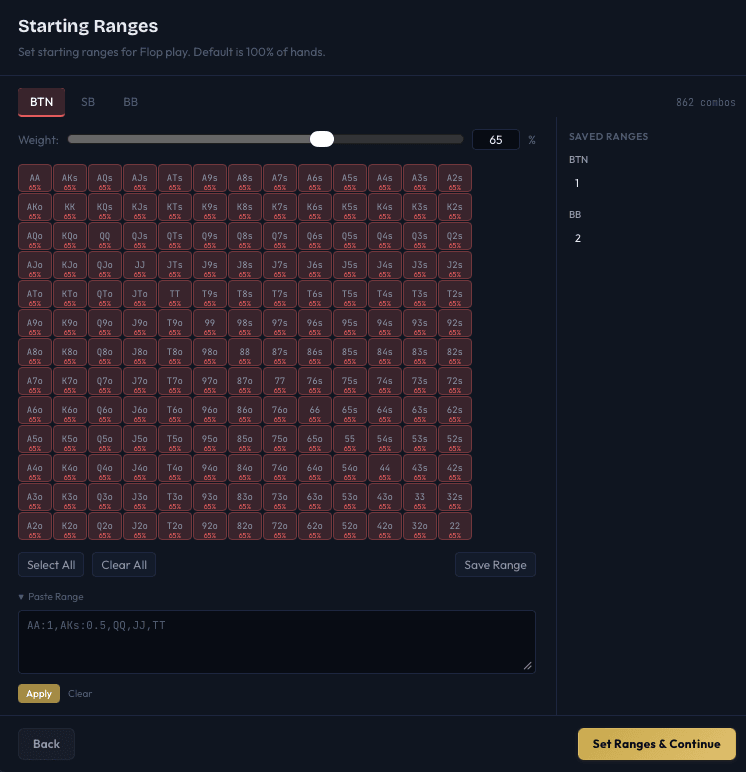
Each cell has a weight from 0.0 (hand never included) to 1.0 (hand always included). The weight is displayed as a percentage in the bottom corner when it is between 1% and 99%.
Cells are color-coded by intensity - darker means a lower weight, brighter means a higher weight.
Painting Weights
The weight slider at the top controls what value is applied when you click or drag on cells:
- Set the Weight slider to the desired percentage (e.g., 50%).
- Click a cell to set it to that weight. Clicking again toggles between the paint weight and 0/100%.
- Click and drag across multiple cells to paint them all at the set weight.
Bulk Actions
- Select All - Sets every cell to the current paint weight.
- Clear All - Sets every cell to 0 (empty range).
Paste Range
Expand the Paste Range section to enter a range as text. The format accepts standard hand notation with optional weights:
AA, AKs, AKo:0.5, QQ, JJ, TT:0.75Supported weight formats:
AKs:0.5- weight of 0.5 (50%)AKs@75- weight of 75%AKs- weight of 1.0 (100%)
Hands can be separated by commas, spaces, or newlines. Clicking Apply clears the current range and replaces it with the parsed text.
Saving and Loading Ranges
You can save frequently-used ranges for reuse:
- Configure a range on the grid.
- Click Save Range.
- Enter a label (e.g., "BTN Open 100bb") and click Save.
Saved ranges appear in a panel on the right side of the dialog, grouped by position. Click a saved range to load it into the current player's grid. Hover and click the x to delete a saved range.
Saved ranges persist across sessions.
How Ranges Affect the Solve
When you set starting ranges, the solver weights each combo according to the specified frequency:
- A hand with weight 1.0 is included at full frequency.
- A hand with weight 0.5 contributes half as many combos to the range.
- A hand with weight 0.0 is excluded entirely.
This affects EV calculations - the solver computes a weighted average over all included combos. It also affects the strategy: if you give BB a tight calling range, the solver's postflop strategy for BB will reflect that tighter range.
Validation
- No empty ranges: Every player must have at least one hand in their range. An error message appears if any player's range is completely empty.
- 100% ranges: If all players have 100% on all hands, the dialog shows an info banner and offers a Skip (100% Ranges) button to continue without setting any range restrictions.
Saving Ranges with Tree Files
When saving a tree (.tree file), you are prompted to include starting ranges with the file. If you choose to include them, the ranges are stored inside the tree file and restored automatically when the tree is opened later.
Tips
- Use text paste for precision. If you have a range from another tool (e.g., a GTO preflop chart), paste it directly instead of painting cell by cell.
- Start with a solved preflop range. Run a preflop solve first, note the opening and calling frequencies, then use those as starting ranges for a postflop analysis of a specific board.
- Partial weights model mixed strategies. If the preflop solver says BTN opens 76s at 40% frequency, set 76s to a weight of 0.4 in BTN's starting range for the postflop tree.
Next Steps
- Postflop Trees - Configure SPR-based bet sizes and board cards
- Creating a Tree - Set up the game parameters
- Editing the Tree - Fine-tune the tree after building