Abstraction
Abstraction is a technique that lets the poker solver handle the enormous number of possible hand and board combinations without running out of memory. Instead of treating every hand individually on every possible board, the solver groups similar hands into buckets - clusters of hands that play similarly given the board texture.
This page covers the abstraction settings found in the Config drawer under the Abstraction section.
Why Abstraction Matters
A full poker game tree with no abstraction would require tracking strategy for every one of the 1,326 possible hold'em hands across thousands of possible board runouts. That is far too much to fit in memory for multi-street trees.
Abstraction solves this by saying: "These 50 hands all behave similarly on this type of board, so let's treat them as one group." The solver then computes a strategy for each bucket rather than each individual hand, dramatically reducing memory usage.
The tradeoff is accuracy. Coarser abstraction (fewer buckets) uses less RAM and converges faster, but may miss subtle differences between hands. Finer abstraction (more buckets) captures more nuance but requires more memory and iterations.
Balanced Mode
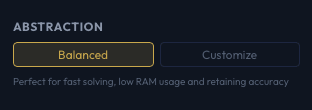
Balanced is the default abstraction preset. It provides a good compromise between accuracy, memory usage, and solve speed.
Balanced mode uses these settings:
| Street | Texture |
|---|---|
| Flop | Subset-487 |
| Turn | Small |
| River | Small |
The bucket count per street defaults to 30 (configurable separately in Customize mode).
For most study and practice, Balanced mode is the right choice. It is tuned to give accurate results without excessive memory requirements.
Customize Mode
Switch to Customize to take full control over the abstraction parameters.
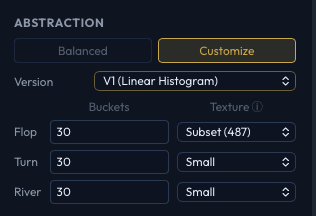
Abstraction Version
Two bucketing algorithms are available:
V1 - Linear Histogram (default for CLI)
- Groups hands by linear equity histogram features.
- Faster to compute during setup.
- Uses hierarchical
[N, 4]bucketing internally (your bucket count of 30 becomes 120 total buckets). - Good general-purpose choice.
V2 - K-Means Distributions
- Groups hands using K-Means clustering on full equity distributions.
- More accurate than V1, especially for distinguishing draws from made hands.
- Uses more memory during setup and takes longer to generate bucket tables.
- Uses flat bucketing (a bucket count of 30 means exactly 30 buckets, though internally multiplied by 4 for consistency).
For most users, V1 is sufficient. Switch to V2 when you need higher fidelity, particularly for postflop analysis where distinguishing draws from made hands matters.
Bucket Counts
Each street has its own bucket count setting. The default is 30 for all streets. Higher values create finer groupings.
| Street | Default | Effect of Increasing |
|---|---|---|
| Flop | 30 | Better flop strategy differentiation. Moderate memory increase. |
| Turn | 30 | Better turn play. Larger memory increase than flop. |
| River | 30 | Better river play. Largest memory impact per bucket since the river has the most possible boards. |
Typical ranges:
- 10-20 - Lightweight, good for quick iteration
- 30 - Default, balanced accuracy
- 50-100 - High accuracy for detailed analysis
- 150+ - Maximum accuracy, requires significant RAM
Flop Texture
Controls how many distinct flop board types the solver recognizes. More textures means the solver can distinguish, for example, a monotone flop from a rainbow flop.
| Option | Flop Types | Description |
|---|---|---|
| Perfect (1755) | 1,755 | Every canonical flop combination. Maximum accuracy. |
| Subset (487) | 487 | A weighted sample of representative flops. Good accuracy with significantly less memory. |
| Subset (373) | 373 | Medium sample. A bit less accurate but lighter. |
| Subset (198) | 198 | Small sample. Fast and lightweight. |
| None | 1 | No texture differentiation. All flops treated the same. |
"Perfect" means the solver considers every one of the 1,755 strategically distinct flops when building bucket tables. Subset options sample a representative weighted subset for faster preflop convergence and lower memory usage.
Turn Texture
Controls board texture differentiation on the turn.
| Option | Description |
|---|---|
| None | No turn texture grouping. |
| Small | A small number of turn texture groups. Default in Balanced mode. |
| Medium | More turn groups for better accuracy. |
| Large | Many turn groups. High accuracy, high memory. |
| Perfect | Full turn texture resolution. |
River Texture
Controls board texture differentiation on the river.
| Option | Description |
|---|---|
| None | No river texture grouping. |
| Small | A small number of river texture groups. Default in Balanced mode. |
| Large | More river groups for higher accuracy. |
Practical Guidance
Start with Balanced mode. It is well-tuned for typical preflop and postflop solves and will handle the vast majority of study needs.
Increase abstraction quality for final results. If you are preparing a sim for detailed study or publication, switch to Customize and increase bucket counts or texture quality. Use the Estimate RAM button to verify you have enough memory before starting.
Use the RAM estimator. Before cranking up buckets and textures, always check the estimated memory usage. Doubling bucket counts can more than double RAM requirements, especially for turn and river buckets.
V2 is worth the overhead for postflop work. If you are solving specific postflop spots and care about draw vs. made hand accuracy, V2's K-Means clustering provides meaningfully better results. For preflop trees, V1 is usually sufficient.