Hand Frequencies
The hand frequency table is the primary tool for examining which hands take which actions at any node in the solved game tree. It appears in the bottom section of the left panel after you run a solve.
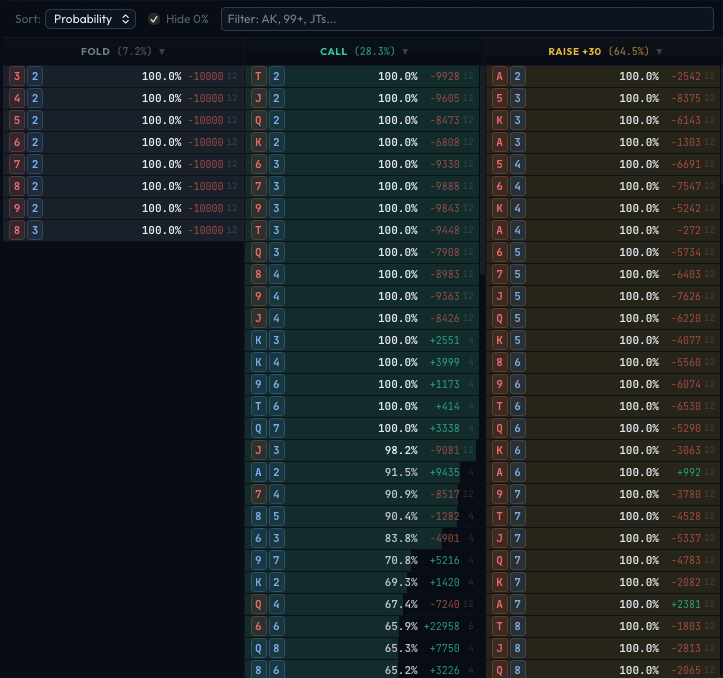
Layout
The table is organized into columns, one per available action at the selected node. For example, at a typical decision point, you might see columns for Fold, Call, and Raise 2.5x.
Each column header shows:
- Action name - The action (Fold, Call, Check, Raise 6x, All-In, etc.).
- Total frequency - The overall percentage of the range that takes this action (e.g., "Fold (32.4%)").
- Sort toggle - Click any column header to toggle between descending and ascending sort order.
Hand Entries
Each row within a column represents one hand (preflop) or one specific combo (postflop). The fields shown for each entry are:
- Hand label - The hand notation. Preflop uses standard shorthand:
AKs(suited),AKo(offsuit),AA(pair). Postflop shows specific combos likeAs Kh. - Frequency - How often the solver plays this action with this hand, shown as a percentage (0-100%) and visualized as a colored bar.
- Combos - The number of specific card combinations this hand represents, weighted by the starting range.
- EV - Expected value for this hand in milli-chips (mc). A milli-chip is 1/1000 of a chip. Positive EV means the hand is profitable; negative means it loses money on average.
Sorting Options
A sort dropdown at the top of the table lets you choose the sort order:
| Sort Mode | Description |
|---|---|
| Probability | Sorts by frequency (highest first by default). The most common view - shows which hands are played most often with each action. |
| EV | Sorts by expected value. Useful for finding the highest and lowest EV hands in each action. |
| Buckets | Sorts by abstraction bucket index. Useful for understanding how the solver's abstraction groups hands. |
Click any column header to reverse the sort direction (ascending/descending). An arrow indicator shows the current direction.
Filtering
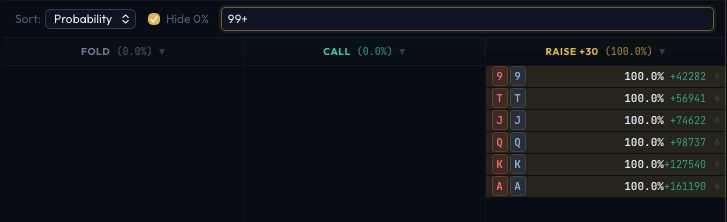
Hide 0%
Check Hide 0% to remove hands with zero frequency from the display. This declutters the view to show only hands that actually take each action. Especially useful when looking at tight actions like 4-bets, where most hands have 0% frequency.
Hand Filter
The text field accepts standard poker hand notation to filter which hands are shown:
- Specific hands:
AK,QJs,99 - Range notation:
99+(all pairs 99 and above),ATs+(AT suited and better) - Multiple hands:
AK, QQ+, JTs
The filter applies across all action columns simultaneously.
Postflop: Made Hand and Draw Groups
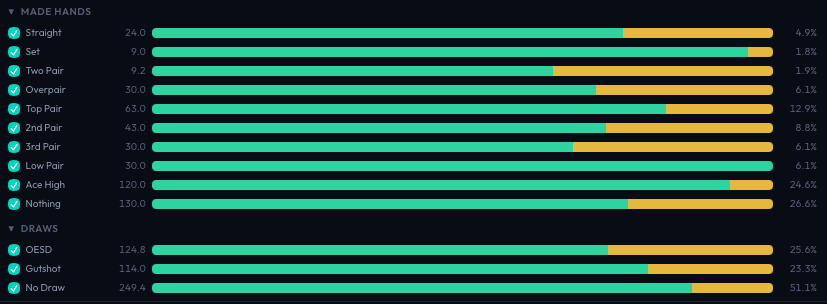
When viewing postflop nodes, two additional collapsible sections appear above the hand frequency table: Made Hands and Draws. These let you filter the displayed hands by their classification on the current board.
Made Hand Categories
Hands are classified into these groups, ordered from strongest to weakest:
| Group | Description |
|---|---|
| Straight Flush | Five cards in sequence, all the same suit |
| Quads | Four of a kind |
| Full House | Three of a kind plus a pair |
| Flush | Five cards of the same suit |
| Straight | Five cards in sequence |
| Set | Pocket pair matching a board card (three of a kind with a pair in hand) |
| Trips | Three of a kind using one hole card and a board pair |
| Two Pair | Two different pairs using at least one hole card |
| Overpair | Pocket pair above all board cards |
| Top Pair | Paired with the highest board card |
| 2nd Pair | Paired with the second-highest board card |
| 3rd Pair | Paired with the third-highest board card |
| Low Pair | Any other pair |
| Ace High | No pair, but holding an ace |
| Nothing | No pair, no ace high |
Draw Categories
Draw groups classify hands by their drawing potential (flop and turn only):
| Group | Description |
|---|---|
| Flush Draw | Four cards to a flush (needs one more of the same suit) |
| OESD | Open-ended straight draw - eight outs to complete a straight |
| Gutshot | Inside straight draw - four outs to complete a straight |
| No Draw | No significant draw |
Each group row shows:
- Checkbox - Toggle the group on/off to filter the hand frequency table and strategy grid.
- Group name - The hand category.
- Combo count - How many weighted combos fall into this group.
- Strategy bar - A mini visualization showing the action distribution for hands in this group (same colors as the strategy grid).
- Percentage - What fraction of the total range this group represents.
Unchecking a group hides those hands from both the frequency table and the strategy grid, letting you focus on specific hand types. For example, uncheck everything except "Flush Draw" to see exactly how the solver plays flush draws at this node.
Per-Player Range Display
In multi-way pots, you can view the strategy from any player's perspective. Click a player's seat at the poker table to switch the hand frequency display to that player's range. A colored indicator at the top of the table shows which player's range you are viewing. Click "Reset" to return to the acting player's range.
Live Updates
While the solver is running, the hand frequency table updates every 2 seconds. Early in the solve, frequencies will be noisy and shift significantly between updates. As the solver converges (volatility decreases), the numbers stabilize.