Bet Sizing
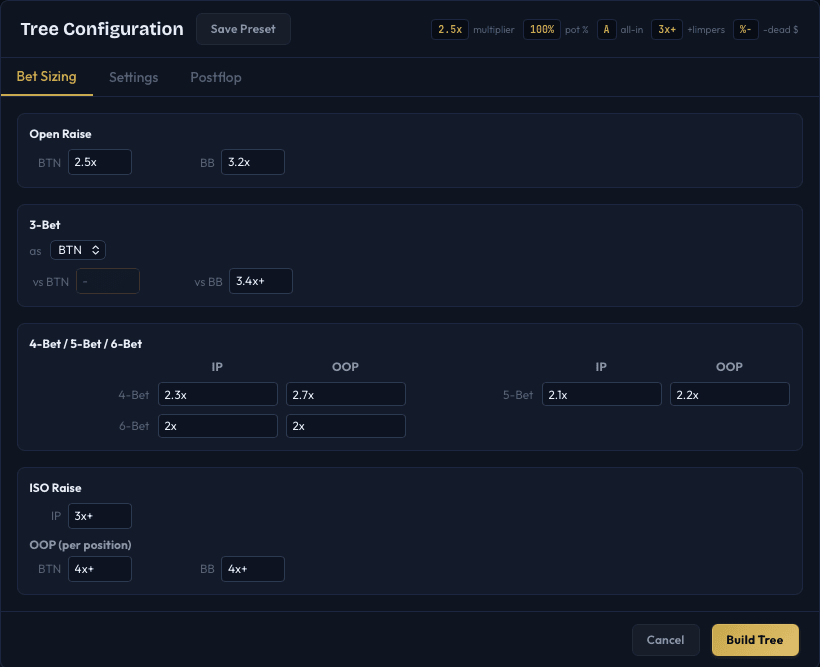
The Bet Sizing tab in the Tree Configuration dialog is where you define how large each raise should be at every level of the preflop action. This directly controls how the game tree is built - each sizing you enter creates a branch in the tree.
Size Format
IkaSolver uses a compact notation for bet sizes. The format legend is displayed at the top of the dialog:
| Format | Meaning | Example |
|---|---|---|
2.5x | Multiply by the big blind | 2.5x = raise to 2.5 BB |
100% | Percentage of the pot | 100% = pot-sized raise |
A | All-in | Goes all-in regardless of pot/stack |
3x+ | Multiplier plus limper adjustment | 3x+ = 3x, plus extra for each limper already in the pot |
%- | Pot percentage minus dead money | 100%- = pot-sized but subtracting dead money from the calculation |
You can combine modifiers. For example, 3.4x+ means "3.4 times the open raise amount, adding extra for limpers."
Multiple Sizes
You can enter multiple sizes separated by commas in a single field to create multiple branches at that decision point. For example, entering 2.5x, 3x as BTN's open raise creates two raising options for the BTN: one at 2.5x and one at 3x. The solver then determines the optimal mix between them.
Open Raise
The Open Raise section has one field per position. Each value defines how large that position's open raise will be when they are the first to put in a voluntary raise.

For example, with default settings:
- BTN:
2.5x- Button opens to 2.5 big blinds - SB:
3.2x- Small Blind opens to 3.2 big blinds (larger since they will be out of position postflop) - BB:
3.2x- applies when BB can raise (e.g., facing a limp)
In poker terms, the open raise is the first raise in the hand. The solver will determine whether each position should fold, limp (if allowed), or raise to the specified size.
3-Bet
The 3-bet section lets you set re-raise sizes for each position pair. Select the 3-bettor from the dropdown ("as BTN", "as SB", etc.), then set the 3-bet size against each opponent.

For example, setting the 3-bet size "as SB vs BTN" to 4.4x+ means: when the SB 3-bets against a BTN open, the raise size is 4.4 times the open raise amount, with a limper add-on.
The + suffix adjusts the sizing when there are callers between the opener and the 3-bettor. Without the +, the 3-bet size ignores intervening callers.
4-Bet / 5-Bet / 6-Bet
Higher re-raise levels have separate settings for in position (IP) and out of position (OOP):
| Level | Default IP | Default OOP |
|---|---|---|
| 4-Bet | 2.3x | 2.7x |
| 5-Bet | 2.1x | 2.2x |
| 6-Bet | 2x | 2x |
These are multipliers of the previous raise. A 4-bet of 2.3x means the 4-bet is 2.3 times the 3-bet amount.
In poker terms:
- 4-bet: Re-raising the 3-bet (e.g., UTG opens, CO 3-bets, UTG 4-bets)
- 5-bet: Re-raising the 4-bet
- 6-bet: Re-raising the 5-bet (rare at deeper stacks, but the tree supports it)
OOP sizes are typically larger because the out-of-position player wants to build the pot before losing the positional advantage postflop.

ISO Raise
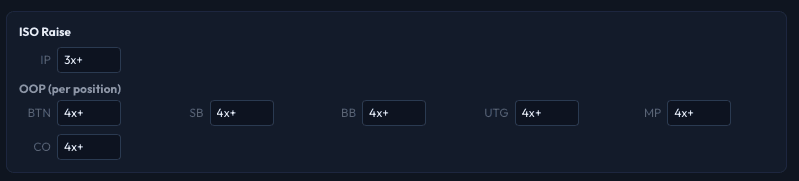
ISO (isolation) raise sizes apply when a player raises over limpers - that is, when one or more players have called the big blind without raising.
- IP: A single size used when isolating from in position (default:
3x+) - OOP: Per-position sizes when isolating from out of position (default:
4x+for all positions)
The + suffix adds extra chips per limper. Without it, the ISO raise would be the same regardless of how many players limped.
Fill All as Pot
The Settings tab has a convenience button called Fill All as Pot (100%). Clicking it sets every sizing field (open raises, 3-bets, 4-bets, 5-bets, 6-bets, and ISO raises) to 100%. This is useful as a starting point for pot-limit structures or for quickly resetting all values.
Tips
- Fewer sizes = faster solves. Each additional sizing at a decision point multiplies the number of tree nodes. Start with one size per action level and add more only if you want to study mixed sizing strategies.
- Use the
xformat for preflop and the%format for postflop-style sizing. Thexformat is relative to the big blind (or previous raise), while%is relative to the current pot. - The
+modifier matters for multiway pots. Without it, a 3-bet size stays the same whether there are 0 or 3 callers between the opener and the 3-bettor.
Next Steps
- Postflop Trees - Configure postflop bet sizes with SPR tables
- Settings Tab - All-in thresholds, max calls, limpers, and other tree options
- Presets - Save and load your sizing configurations