Batch Scripting
When working with postflop trees, you often want to solve the same tree structure across many different flop textures. The Script feature automates this by solving a list of flops sequentially and saving each result as a separate .iks file.
The Script button appears in the toolbar for postflop trees only (trees that start from the flop, turn, or river).

Opening the Script Panel
Click the Script button in the toolbar to open the batch solve configuration panel.
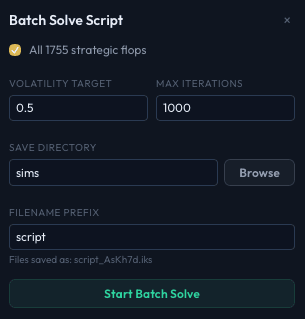
Configuring a Batch Solve
Flop Selection
Choose which flops to solve:
- All 1755 strategic flops (checked by default) - Solves every canonical flop combination. This is the most thorough option but takes the longest. The 1,755 number represents all strategically distinct flop textures in hold'em after accounting for suit isomorphisms.
- Custom flop list - Uncheck "All 1755 strategic flops" to enter your own list. Type flops in standard card notation, separated by commas or newlines:
Each flop must be exactly three cards. The panel shows how many flops have been parsed (e.g., "3 flops to solve").AsKd2h, AhQc3d, 7s6s5d
Solver Parameters
Two fields control when each individual flop's solve finishes:
- Volatility target - The solve for each flop stops when volatility drops below this threshold. For batch work, a value like 0.3-0.5 is a good balance between accuracy and speed.
- Max iterations - A hard cap on iterations per flop. Useful as a safety limit so no single flop runs indefinitely.
These use the same solver settings values, so changes here are reflected in the main settings and vice versa.
Save Directory
Select the directory where all output .iks files will be saved. Click Browse to pick a folder, or type the path directly.
Filename Prefix
A prefix prepended to each output file. The default is solve. Each file is named:
{prefix}_{flop}.iksFor example, with prefix solve and flop As Kh 7d, the file would be saved as solve_AsKh7d.iks.
Running the Batch
Click Start Batch Solve to begin. The solver works through the flop list one at a time:
- Sets the board cards for the current flop.
- Runs the solver until the volatility target or iteration limit is reached.
- Saves the result as an
.iksfile in the output directory. - Moves to the next flop.
Progress Tracking
While running, the Script button in the toolbar shows the current progress (e.g., "Script 42/1755"). The panel displays:
- Progress bar - Visual percentage of completed flops.
- Current flop - Which flop is being solved now (e.g., "Flop 42 / 1755: As Kh 7d").
- Completed count - How many flops have finished.
- Live stats - Current iteration count and volatility for the active flop.
Any errors encountered during individual flop solves are shown in a red error section at the bottom of the panel.
Cancelling
Click the Cancel button in the progress panel to stop the batch. Flops that have already been saved to disk are kept. The currently solving flop is discarded.
Tips for Batch Solves
- Set a volatility target rather than a fixed iteration count when solving many flops. Different flop textures converge at different rates - dry boards (like K72 rainbow) converge faster than wet boards (like 9h8h7d). A volatility target ensures each flop gets enough iterations for its complexity.
- Use Balanced abstraction for batch work unless you need maximum accuracy. Running 1,755 flops with heavy abstraction takes a very long time and a lot of disk space.
- Check disk space. Each
.iksfile can be tens to hundreds of megabytes depending on tree size and save-through street. For 1,755 flops, plan for significant disk usage. - Leave the batch running overnight. Solving all 1,755 strategic flops is a long operation even on fast hardware. Start it and come back later.