Saving and Loading Trees
Tree files (.tree) save the game tree structure you have configured - player count, stack sizes, blinds, bet sizing, and any node edits you have made. They do not contain solved strategies. Think of a tree file as a blueprint: it defines the problem, not the solution.
Saving a Tree
Go to Tree > Save Tree in the toolbar, or use the keyboard shortcut:
- macOS: Cmd+S
- Windows/Linux: Ctrl+S
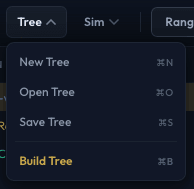
A file dialog appears. Choose a location and filename. The file is saved with the .tree extension.
What Gets Saved
A .tree file contains:
- Tree structure - All nodes in the game tree, including any nodes you have manually added or deleted in the tree editor.
- Game parameters - Player count, stack sizes, blind sizes, ante, dead money.
- Bet sizing configuration - Open-raise sizes, 3-bet sizes, postflop SPR tables, all-in thresholds, and all other tree-building settings.
- Starting ranges - If you have set custom starting ranges for a postflop tree, these are included.
A .tree file does not contain:
- Solved strategies (those are saved as
.ikssim files). - Solver settings (threads, iterations, abstraction) - these are separate from the tree.
Loading a Tree
Go to Tree > Open Tree in the toolbar, or use:
- macOS: Cmd+O
- Windows/Linux: Ctrl+O
Select a .tree file. The tree loads and you can view it in the tree editor, modify it, or run a solve on it.
When to Save Trees
- Before solving - Save your tree configuration before running a long solve. If the application closes unexpectedly, you can reload the tree without reconfiguring everything.
- Reusable configurations - Save trees that represent common scenarios you study (e.g., "6max 100bb cash", "HU SB vs BB 50bb"). You can load them later, adjust parameters, and solve again.
- Sharing - Tree files can be shared with other IkaSolver users. They can load your tree and run their own solve with their preferred settings.
- After editing - If you have manually edited the tree (adding or removing nodes), save to preserve your edits.
Tree Files vs. Sim Files
| .tree files | .iks files | |
|---|---|---|
| Contains tree structure | Yes | Yes |
| Contains solved strategies | No | Yes |
| Contains starting ranges | Yes | Yes |
| File size | Small (KB) | Large (MB-GB) |
| Use case | Save/share tree configurations | Save/share solved results |
If you want to save your solved results, use Sim > Save Sim instead.