Saving and Loading Sims
Sim files (.iks) contain the full solved strategy along with the game tree. After running a solve, you can save the results to disk and reload them later without re-solving. The .iks format is IkaSolver's native strategy file format.
Saving a Sim
Go to Sim > Save Sim in the toolbar. A submenu appears with a "Save through" street picker:
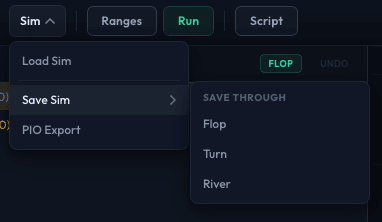
Save Through Street
The street picker controls how many streets of strategy data are included in the file:
| Option | What Is Saved |
|---|---|
| Preflop | Only preflop strategies. Smallest file. |
| Flop | Preflop + flop strategies. |
| Turn | Preflop through turn strategies. |
| River | All streets - the complete solved strategy. Largest file. |
Only streets at or after the tree's starting street are shown. For example, a flop tree shows Flop, Turn, and River options but not Preflop.
Why not always save everything? File size. A full preflop tree solved through the river can produce .iks files that are gigabytes in size. If you only need preflop ranges, saving through Preflop produces a file that is orders of magnitude smaller. For postflop work where you only care about flop play, saving through Flop avoids storing turn and river data you may not need.
After selecting the street, a save dialog appears. Choose a filename and location. The .iks extension is added automatically if not provided.
The status bar shows "Saving sim..." while the file is written, then confirms the save path.
Loading a Sim
Go to Sim > Load Sim in the toolbar.
Select an .iks file. IkaSolver loads both the tree structure and the solved strategies. After loading, you can immediately browse the results in the strategy grid, hand frequency table, and other result views.
Loading a sim replaces any currently loaded tree and results.
PIO Export
IkaSolver can export preflop strategies in a format compatible with PioSolver. Go to Sim > PIO Export.
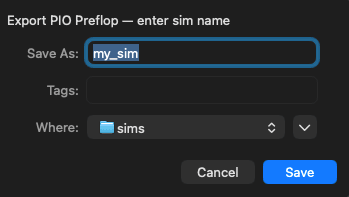
A save dialog asks for a "sim name" (not a full file path). IkaSolver creates a directory structure at the chosen path with individual range files that PioSolver can import for postflop analysis.
PIO Export is available whenever you have solver data (either from a fresh solve or a loaded sim). It exports the preflop strategies for all positions.
File Size Considerations
.iks file sizes depend on:
- Tree size - More nodes means more strategy data. Multi-way pots and many bet sizing options create larger trees.
- Save-through street - Each additional street adds substantially more data.
- Abstraction - Higher bucket counts and finer textures produce more strategy entries and larger files.
Typical sizes:
- Preflop-only save: 1-50 MB
- Full preflop tree through river: 500 MB - 5 GB
- Postflop tree (single flop): 10-200 MB
Workflow Tips
- Save sims after long solves. If you ran a million-iteration solve overnight, save the results so you do not have to re-solve if you close the application.
- Save through the street you need. If you are studying preflop ranges, save through Preflop. You can always re-solve for deeper streets later using the same tree file.
- Use descriptive filenames. Include the scenario in the name, like
6max_100bb_NL50_rake5pct.iksorHU_SBvBB_50bb_1M_iters.iks. - Share sims with study partners.
.iksfiles are self-contained - the recipient can load and browse without needing the original tree file.